Can You Really Test Software 100%? Understanding Test Coverage
Summarize this article with:
A dashboard, traceability matrix or test report shows a reassuring result: 100% test coverage. It is tempting to read this as “everything has been tested.”
The number may be correct. But it may only mean that every planned test ran. Or that every line of code was executed. Or that every requirement has at least one linked test. In all three cases, important scenarios can still be missing.
So before trusting the score, ask what it measures. Once that is clear, the 100% becomes much easier to read.
What Does “100% Test Coverage” Actually Mean?
Every percentage needs a total to compare against. If 100 tests were planned and all 100 ran, execution coverage is 100%. If every requirement has a linked test, a traceability dashboard may also show 100%. Both calculations are correct. They simply measure different things.
When I see a perfect score, I want to know three things. What is being counted? What makes an item covered? What has been left out?
A metric can only answer the question behind its calculation. That is not a weakness. We just need to know the question before we use the answer.
Different Coverage Metrics Answer Different Questions
Teams use the word coverage for several measurements. Each answers a different question.
- Code coverage asks which parts of the implementation were exercised, often through statements, branches or conditions.
- Requirements coverage asks which requirements are connected to verifying tests or other evidence.
- Test execution coverage asks how much of the planned test set has been run, and sometimes how much passed.
- Scenario or behavioral coverage asks which expected paths, conditions and outcomes have actually been checked.
These views work together, but they are not interchangeable. Running every planned test does not prove that the plan contains every test you need. Executing every line does not prove that the test checked the right result. Linking one test to every requirement does not prove that the whole requirement was verified.
The percentage is more useful when the dashboard tells you which type of coverage you are looking at.
How 100% Coverage Can Still Hide Gaps
Take a simple sign-in requirement. After three wrong passwords, the system must lock the account for 15 minutes. It must record the event. After 15 minutes, the user must be able to sign in again.
A test enters three wrong passwords and checks that the account is locked. The test is linked to the requirement. It checks an important behavior. If one linked test is enough to mark a requirement as covered, this one gets the Covered status.
But the test does not check the security log. It does not check that the lock lasts 15 minutes. And it does not check that sign-in works again afterward. A dashboard can still report “100% of requirements linked to tests.” That result is correct, even though several behaviors have not been tested.
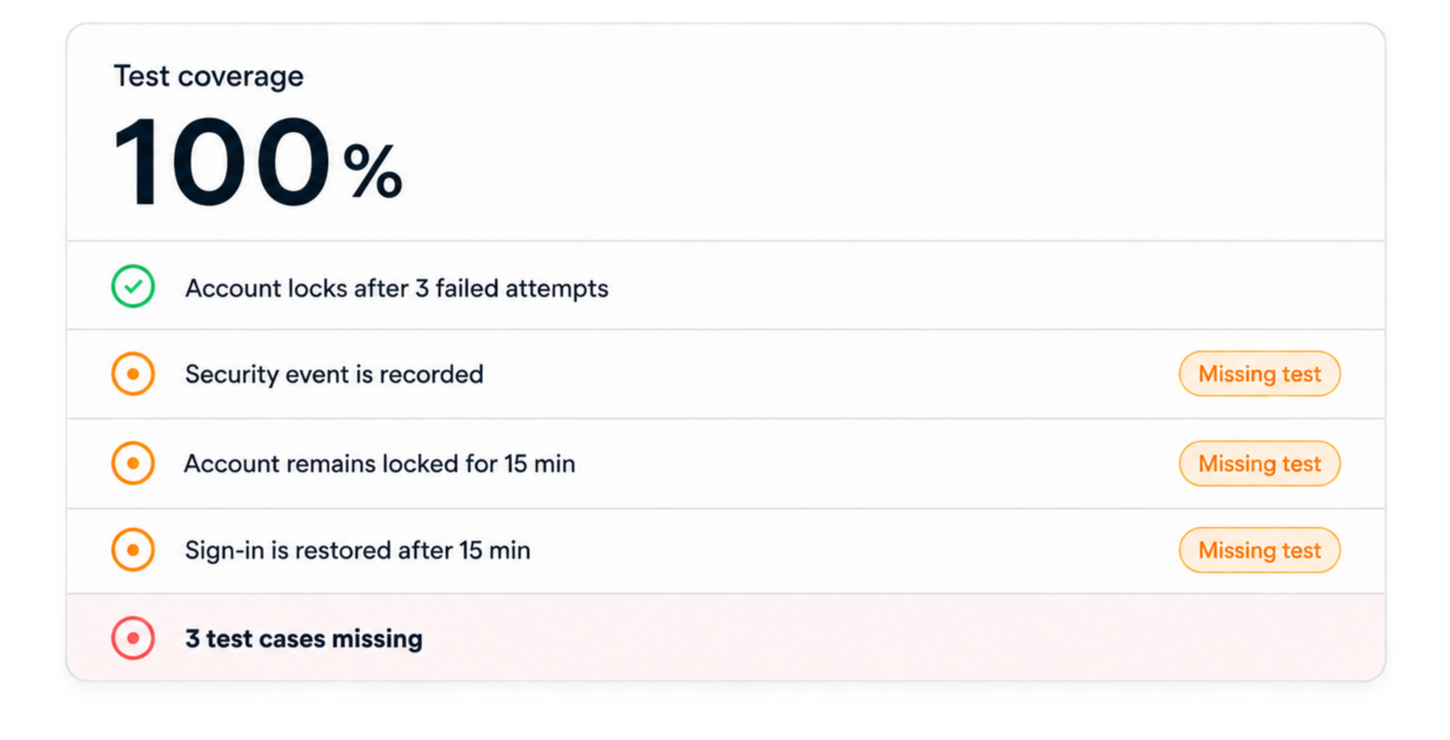
The metric has done its job: it found a link. The problem starts when we read that link as proof that the whole requirement was tested.
That is the key difference. “Every requirement has a test” does not always mean “every expected behavior has been tested.”
Covered Does Not Always Mean Fully Verified
A binary Covered / Uncovered view is useful. It quickly finds requirements with no test. On a large specification, that is a good first check.
But it hides detail in our sign-in example. We tested the lock. We did not test the log, the 15-minute delay or the return to normal. Calling the whole requirement Covered makes those missing checks hard to see.
A more useful view can separate Fully covered, Partially covered and Uncovered requirements. Fully covered means the tests address the expected behaviors in the requirement. Partially covered means that some useful tests exist, but something is still missing. Uncovered means that no suitable test was found.
These statuses do not make the decision for the engineer. They show where the engineer should look.
What Meaningful Coverage Should Tell You
Useful coverage is not another magic number. It should help you see what has been tested and what still needs work.
- Which requirements have verifying tests?
- What behavior do those tests actually check?
- Which requirements are only partially covered?
- Which expected scenarios or outcomes are still absent?
- When a requirement changes, does its verification remain consistent?
Good requirements traceability gives you the first part of the answer. You can see which test is linked to which requirement. The next step is to read the test and check what it actually proves.
That second step matters in verification and validation work. A reviewer will want the evidence behind the score, not only the score itself.
A high score is good news. Knowing what is inside it is better. The problem is not reaching 100%. It is seeing 100% and deciding there is nothing left to check.
Going Beyond the Percentage with KomAInu
A requirement can have a linked test and still need more testing. This is exactly the problem we are trying to solve with KomAInu.
That is why we chose not to limit KomAInu to a simple Covered / Uncovered status. KomAInu reads the requirements and tests, maps the links between them and shows Fully covered, Partially covered and Uncovered requirements. An incomplete test stays visible, even when a link already exists.
Back to our sign-in example: the lockout test is useful. We should keep it. But the requirement stays Partially covered until tests also check the log, the 15-minute delay and the return to normal.
In practice, the requirement and its tests can be reviewed together. The missing behavior is easier to spot, and the team can review it or generate the tests it needs. You can read more about this coverage-gap analysis.
So, Can Software Ever Be 100% Tested?
Yes, software can reach 100% for a defined metric. Every planned test can run. Every line can execute. Every requirement can have a linked test. These are useful results.
But “100% tested” means very little until we define the 100%. One perfect score cannot prove that every behavior was checked.
Coverage metrics help us measure progress and find gaps. We just need to read them for what they are. The important question is not only “What is our coverage percentage?” It is also “What could still be missing?”
Frequently Asked Questions
Is 100% test coverage possible?
Yes, for a clearly defined metric and scope. The result only shows that the metric's coverage rule has been satisfied; it does not automatically mean every relevant software behavior was verified.
Does 100% code coverage mean software is fully tested?
No. Code coverage shows which implementation structures were exercised. It does not prove that every expected behavior, input combination or assertion was tested.
What is the difference between test coverage and requirements coverage?
Test coverage is a broad term for how much of a chosen test target has been exercised. Requirements coverage specifically examines whether requirements are connected to tests and, in a deeper analysis, whether those tests sufficiently verify their expected behavior.